
In 6 hours, build a personal AI system that pulls your data together, prepares your daily priorities, tracks your team’s work, and helps you overdeliver on your KPIs.
Your team and colleagues are already using AI without you. They just haven’t told you yet.
The Unfair Advantage.
One day. One working system. A head start your competition can’t close.
Walk out with a working system on your laptop. Not theory. Not certificates. The tools that make you the person in your office who figured AI out first.
This is not for everyone. If you want a lecture about “what is AI” or a certificate for your wall, this is not the right room. This is for leaders who want a working system installed before the day is over.
You Already Know AI Is Important.
So why does it still feel like everyone else got the memo except you?
- You’ve sat through the keynotes.
- You’ve seen the LinkedIn posts from peers who suddenly talk about AI like they’ve been building systems for years.
- You’ve opened ChatGPT, typed something in, and gotten back a wall of generic text you wouldn’t show anyone on your team.
And you’ve had the quiet thought every senior leader in Singapore is having right now:

“What if I’m already behind,and I just don’t know how far?”
Here’s what nobody will tell you to your face.
Your junior staff and colleagues are picking this up faster than you. Not because they’re smarter. Because they have fewer habits to unlearn, less ego on the line, and more time to experiment. They’re not waiting for a training programme. They’re figuring it out over lunch.
Meanwhile.
- The market is selling you courses that teach theory.
- Certificates that collect dust.
- “Prompt engineering” workshops that show you how to talk to a chatbot like it’s a search engine, and produce nothing useful by Monday morning.
You’ve probably tried one. Maybe two. And both times you walked out thinking:
“That was interesting, but I still don’t know how to use this in my actual work.”
That’s not a knowledge gap. It’s not a discipline gap either.
It’s an architecture problem.
You were never shown how to build the infrastructure that makes AI actually work for your role, your team, your recurring tasks. Every day, not just in a workshop.
Until now.
“What changed for me wasn’t learning a new tool. It was realising I’d been the bottleneck in my own business.”
Here’s What Changes When AI Actually Works the Way It Should.
Faster
Do in minutes what used to take hours.
That report you spend 90 minutes assembling every week? AI drafts the first version in four minutes.
Those follow-up emails after every meeting? Written before you finish your coffee.
The research your boss needs by end of day? Pulled together and formatted while you’re still in the next meeting.
Time you used to spend on repetitive writing comes back to you.
Permanently.
Better
Better analysis. Better decisions. Better output.
AI doesn’t just speed up your work.
It improves it.
Sharper research. Cleaner briefs. More thorough comparisons.
When AI has your full context, the quality of what it produces goes up with every task.
Your first drafts start looking like second drafts. Your analysis catches things you would have missed at 5pm on a Friday.
The impossible
Overdeliver on your KPIs in ways nobody thought were possible.
Build a working dashboard for your team’s KPIs in one afternoon, without writing code or waiting three months for IT.
Pull together a competitive analysis from five different sources that would have taken a consultant two weeks.
Turn scattered department files into a complete SOP library that updates itself, pushes to your project management system.
And is ready for every new hire automatically.
Present your director with the strategic initiative they’ve been asking for, fully scoped, when they expected a status update.
The people who get promoted aren’t just faster at their current job. They’re the ones who tackle projects everyone else says “we don’t have the bandwidth for.”
Let us be upfront about one thing. There are no certificates in this room.
We don’t do certificates. We don’t care about them.
What we care about is practical impact: what you build here, what it does for your work, and how it changes the way your department operates starting Monday.
This Is Not a Course.
It’s an Installation.
When we say installation, we mean this:
By 6pm on your workshop day, there is a working system on your laptop.
- Not notes about a system.
- Not a plan to build one later.
The actual system, configured to your role, loaded with your knowledge, ready to use on Monday. Like getting a new piece of software set up, except this one is built around your specific job.

Here’s why that matters.
Think about how most people use AI right now. You open ChatGPT. You type a question. It gives you a generic answer. You close the window. Tomorrow, you open it again, and it’s forgotten everything.
- Your role.
- Your context.
- Your projects.
- Your team.
Everything.
It’s like the movie 50 First Dates. Every conversation starts from zero. You spend more time re-explaining yourself than getting useful work done.
That’s not AI working for you. That’s you working for AI.
The Unfair Advantage fixes this in one day.
Here’s one example of what changes.
Every month, your team pulls numbers from three different systems, formats them into a deck, writes the commentary, and sends it to leadership. That takes two people the better part of a day.

After this workshop, AI pulls the data, drafts the commentary in your team’s style, formats the deck, and presents it to you for review. The full-day process becomes a 30-minute review.
That’s what happens when your AI has context. Your context, loaded once, reused across every task. That’s exactly what you’ll build during this session.
You don’t study AI for six hours. You build your AI working system during those six hours, with your own role, your own knowledge, your own department’s tasks loaded in.
By the time you stand up from your seat, you have four things on your laptop that didn’t exist when you sat down:
1. Your AI Workspace, Set Up for Your Work
We help you set up your AI around your role, your responsibilities, and how you like things done. You’ll test it on your own work before you leave.
2. Your “Second Brain”
The documents, tasks, notes, and preferences that help AI understand your work. So it doesn’t have to start from a blank page every time.
3. Your AI Coworker
Give your AI a real task from your department, let it handle the preparation, and come back to work that’s ready for review. Nothing is sent or published without your sign‑off.
4. A Dashboard That Shows What Matters
Turn spreadsheets and reports into a working view of the numbers that matter to your role. You’ll build a prototype from sample data during the session, by describing what you want.
This is what separates an installation from a course. You don’t leave with notes. You don’t leave inspired.
You leave equipped.
“What I valued was the systems-first approach. It helped me strengthen the infrastructure behind how I was already using AI. Organising knowledge, building a second brain, developing workflows that go beyond the chat window.”
You Walk in with a Laptop.
You Walk Out with Four ThingsThat Didn’t Exist When You Sat Down.
01
Your AI Workspace, Set Up for Your Work
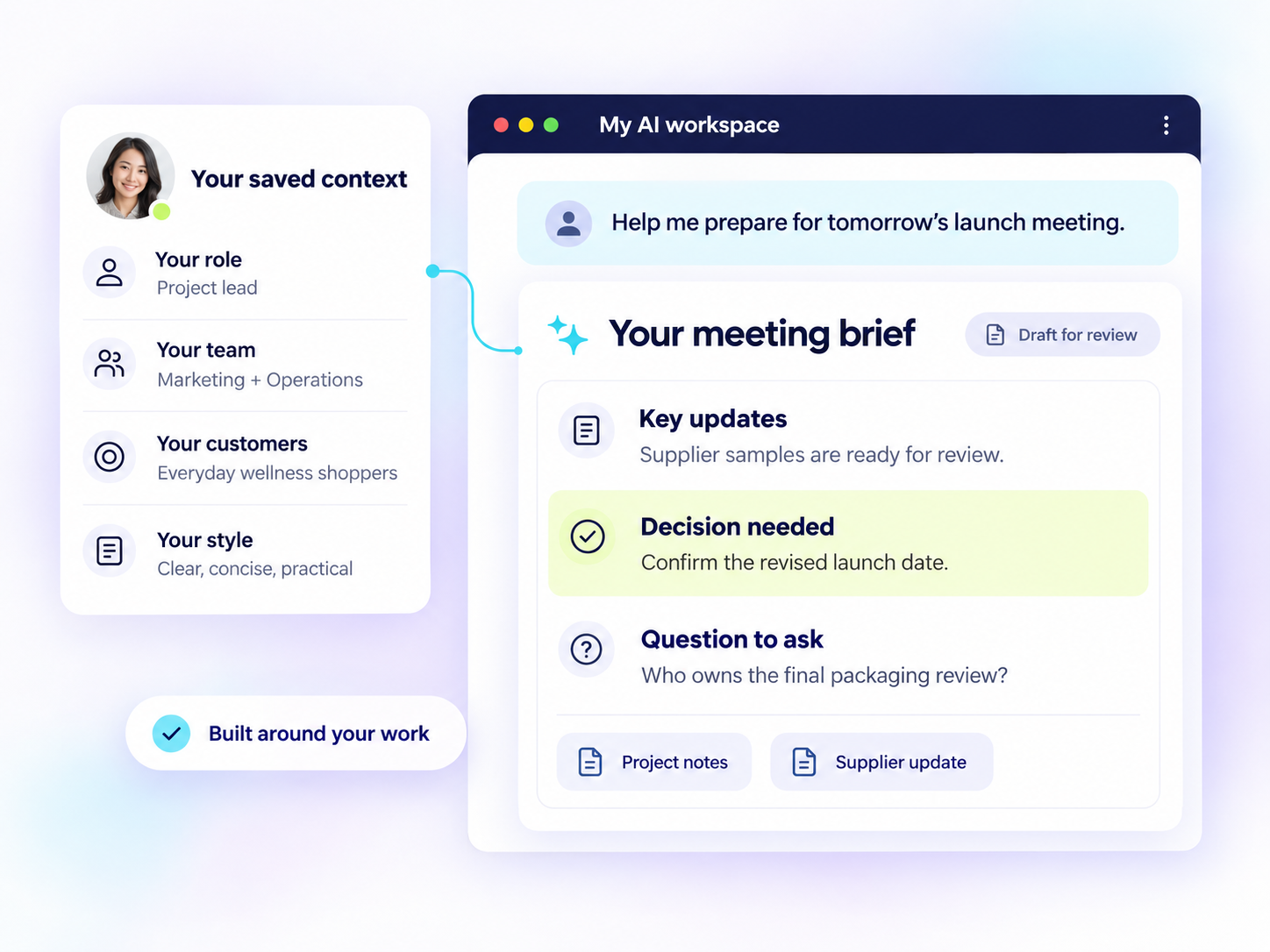
We help you set up your AI around your role, your responsibilities, and how you like things done. Your key information and files are organised in one place.
Your workspace includes:
- Your role and priorities: What you’re responsible for, what you’re working on, and what matters most right now.
- Your team and stakeholders: Who you work with, who you report to, and the key people across your department or business.
- The people you serve: Whether that’s customers, clients, internal teams, or all three. Who they are, what they need, and the problems you help solve.
- Your communication style: Your preferred tone, wording, and examples of how you write. So AI sounds like you, not a chatbot.
You’ll test it on your own work before you leave, so you know how to use it.
What changes:
- Meeting preparation becomes easier. Give your AI the relevant reports and notes. It helps pull together key updates, highlight decisions needed, and draft talking points for you to review.
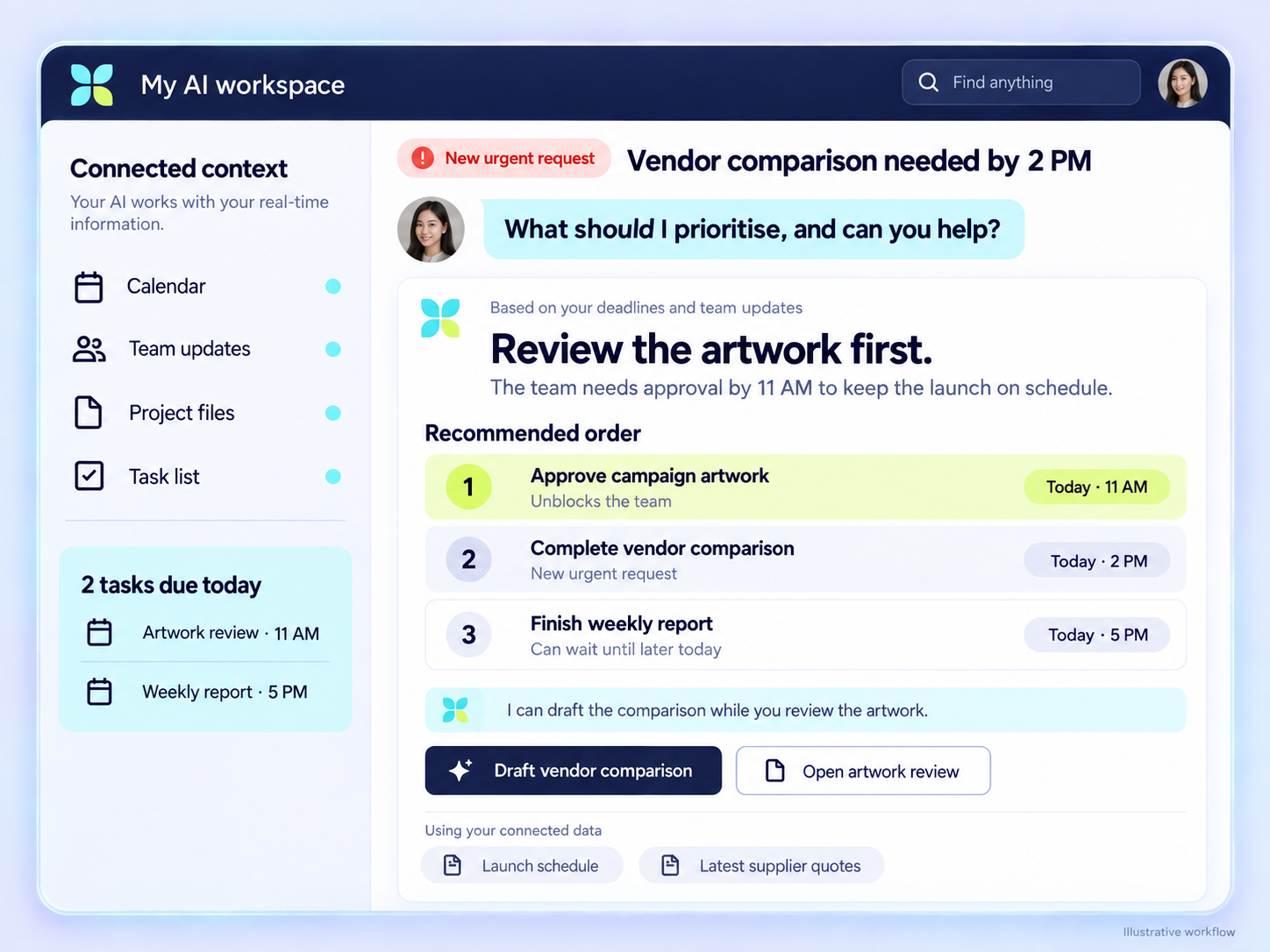
- Last minute requests become more manageable. Your boss asks for a vendor comparison by tomorrow. Your AI helps research the options, organise the information, and flag missing details, so you can focus on the recommendation.
- Long documents become easier to work through. A 40 page PDF arrives. Ask, “What do I need to act on, and where does the document say that?” Your AI helps identify the relevant points and pages for you to check.
- You spend less time repeating yourself. Your AI can refer to your saved information, role, stakeholders, and writing preferences instead of needing the same introduction in every conversation.
Less time gathering information and preparing first drafts. More time for decisions, your team, and getting work done.
02
Your “Second Brain”
So your AI doesn’t have to start from a blank page every time.
Your Second Brain brings together the information that helps AI understand your work: your role, your team, the people you serve, and how you like things done.
It includes your:
- Documents, templates, and SOPs.
- Tasks, priorities, and deadlines.
- Meeting notes, decisions, and follow-ups.
- Calendar and upcoming commitments.
- Writing preferences and examples of past work.
With the relevant information saved or connected, your AI can refer to it instead of asking you to explain everything again.
For example, when you ask, “Help me prepare for tomorrow’s meeting,” your AI can use the available calendar details, previous meeting notes, and project updates to prepare a useful brief.
Why this makes a difference:
- Without context: You explain your role, find the files, paste the background, and describe what you need each time. The answer may still be generic.
- With a Second Brain: Your AI has relevant background to work from. It can produce a draft that better reflects your work, priorities, and preferences.
The difference isn’t just which AI model you use. It’s the context you give it.
Your AI won’t automatically know everything about you. But an organised, up to date Second Brain gives it a much better starting point, with you deciding what it can access.
03
Your AI Coworker
Give your AI a task, let it handle the preparation, and come back to work that’s ready for review.
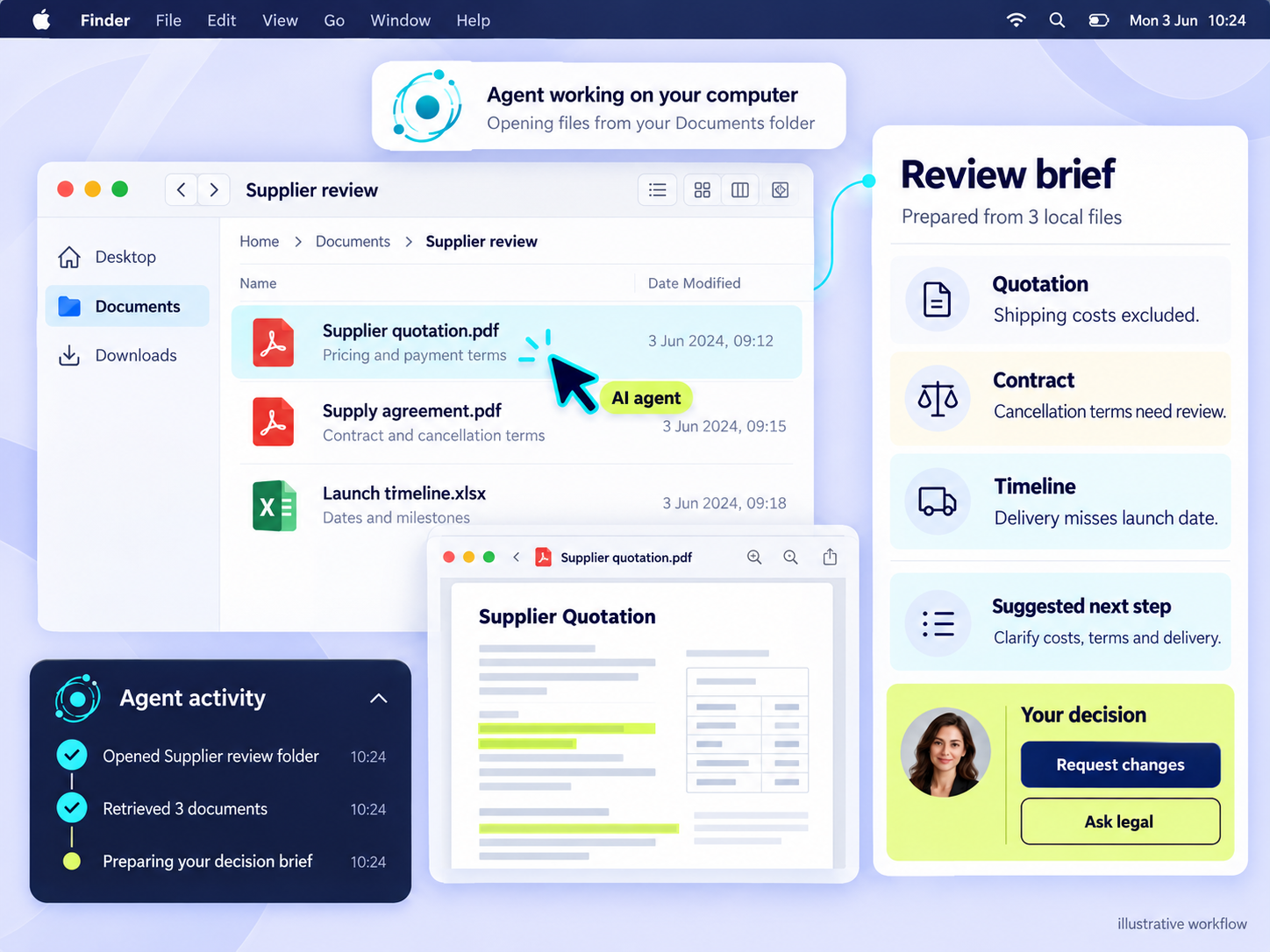
We help you set up and test one workflow around your department’s actual needs. This could involve using approved websites, working with files, or running a recurring task overnight.
- Start the morning with your priorities ready. Instead of opening several apps to work out what needs attention, schedule your AI to review the available tasks, calendar, and meeting notes before your day begins. It prepares a morning brief with upcoming meetings, outstanding follow-ups, and decisions that need you. You start with a clear picture of the day, rather than searching for it.
- Let AI handle the clicking and gathering. For a suitable task, your AI coworker can use approved browser or desktop tools to navigate pages and gather information. For example, ask it to check three supplier websites, collect product specifications and prices, and prepare a comparison with source links and missing details flagged. You review the options instead of spending your time opening tabs and copying information.
- Prepare research overnight. Set a recurring task to check selected competitors’ public websites for new products, offers, or announcements. Your AI prepares a summary of what changed, with links for you to verify. You review it the next morning and decide whether anything needs action. The aim is to have useful preparation waiting for you, not another task waiting to be started.
We test the workflow, define what AI can access, and agree where it must stop for approval. Nothing is sent, purchased, or published without sign-off.
04
A Dashboard That Shows What Matters
See the bigger picture without reading through rows of data.
Use AI to turn spreadsheets and reports into a working dashboard, with the numbers that matter to your role.
- CEO dashboard: See revenue, costs, business performance, and areas that need attention.
- Marketing dashboard: Track campaign spending, leads, cost per lead, and which channels are delivering results.
- Sales dashboard: See sales against targets, potential deals, and team performance.
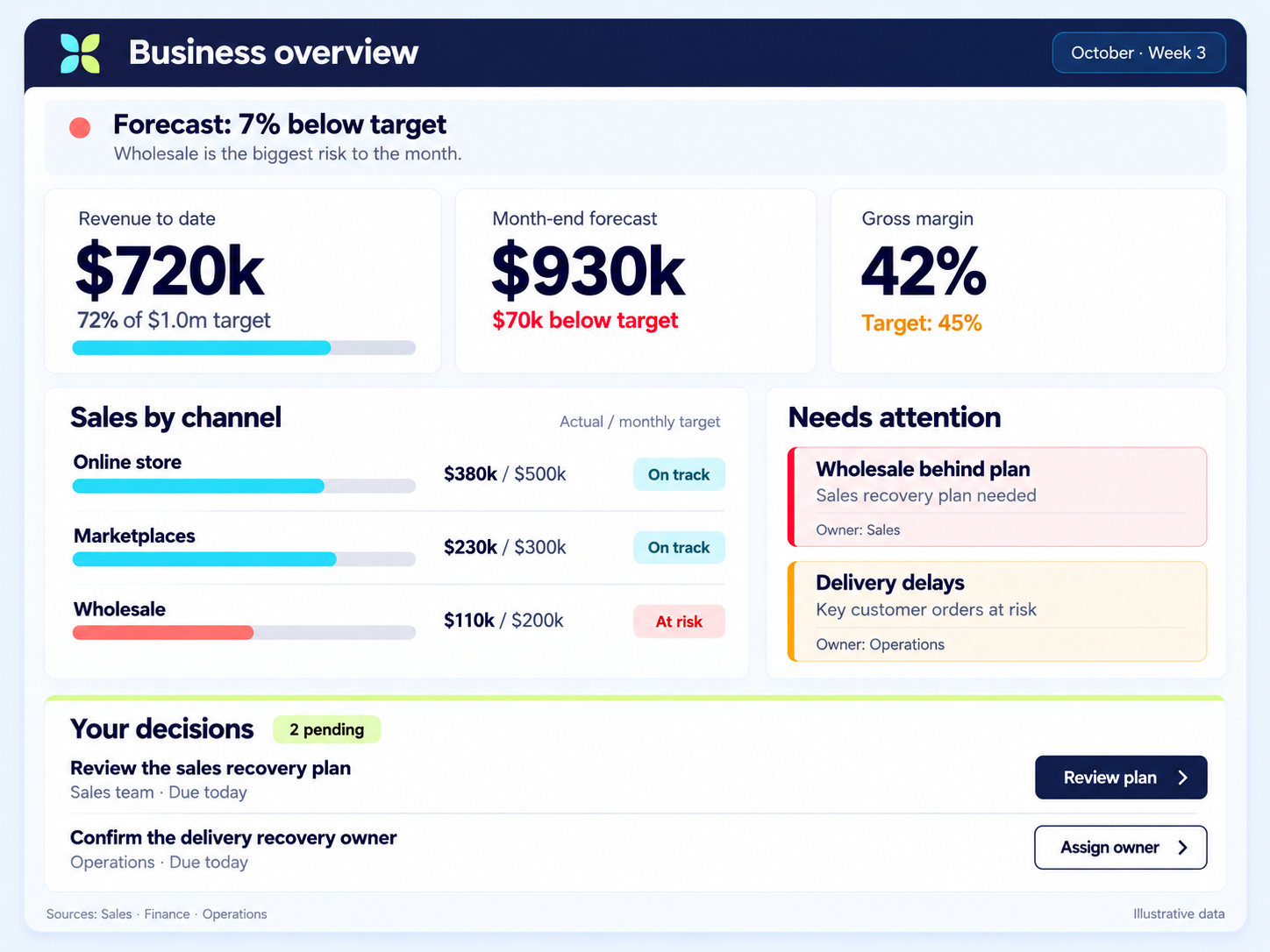
Instead of checking several reports line by line, you get a bird’s eye view of what’s happening, making it easier to spot trends and decide where to focus.
Build it by describing what you want.
- You don’t need to learn a programming language first. With vibe coding, you describe what you want in everyday language, let AI help build it, then test and refine the result.
- During the session, you’ll create a working dashboard prototype using sample data. You can show it to your team, gather feedback, and decide what to develop further.
- Turning a business need into a working tool is an important skill in the AI era. It helps you move beyond asking AI questions to building things that improve how you work.
Everything you build uses your own role, your own tasks, your own department context.
A VP building a board-reporting workflow gets a completely different installation than a manager building a team‑briefing system.
Same method, different output.
What’s Really at Stake if You Wait
Companies across Singapore are restructuring. Not because business is bad.
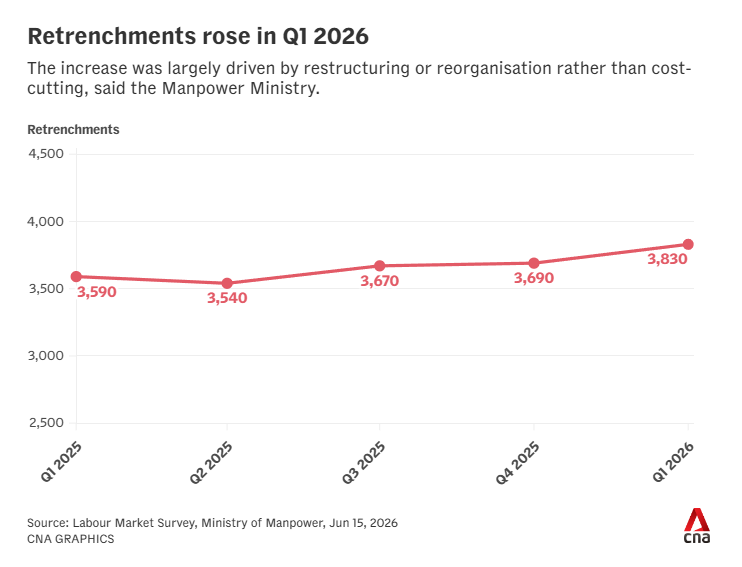
Because AI is changing which roles are worth more
and which ones aren’t.
Your junior staff are already producing work that used to require your experience. They started before you did. Every month you wait, that gap gets harder to explain.
There’s a conversation about AI happening in your company’s leadership meetings right now. You’re either the person they call into that room, or the person they talk about.
The next promotion goes to the person who showed up with a working system. Not the person who showed up with a certificate.
Six months from now, your performance review needs a working AI system and results. Not another promise to “explore AI next quarter.”
The cost of waiting isn’t falling behind. It’s becoming the person your company can afford to let go.
Meet Your Trainers
They didn’t learn AI from a course.
They built businesses with it.
Most AI workshops are led by a consultant who picked up AI last quarter, or an academic who’s never had to make payroll. Neither can build you a working system, because they’ve never built one for themselves.
These three have. Three builders. One shared conviction:
You don’t need more AI knowledge. You need a working system that creates real impact, installed by people who’ve already built one inside their own businesses.

Joseph Ho
The Systems Architect
Joseph started in enterprise IT and project delivery, building systems inside organisations before building them for his own businesses.
He founded 3 companies, applying AI agents across marketing, operations, client delivery, and team coordination.
His philosophy is blunt: most people are chatting with AI when they should be building with it.
His training is systems-first and works across platforms. You own your knowledge and your workflows. You’re not locked into any tool. What he installs during the session keeps working long after the session ends.
“Most productivity talks give you mindset tips. Joseph’s session gave me systems. 60 minutes in and I had a clear picture of which parts of my week I could hand off to AI agents, and exactly how to do it.”

Sharlyn Lim
The Bootstrapper
At 19, Sharlyn launched an e-commerce brand from her bedroom. Built the website, ran the ads, and secured distribution in Watsons and the major department stores. No team. No specialists. Every function on the founder.
Seventeen years and 2,000 events later, she’s built YouMedia (an AI digital marketing company), co-founded AI Advantage, and helped one client generate over 80,000 organic visits a month with 1,700 citations across ChatGPT, Perplexity, and Google AI Overviews.
TEDx speaker. NLP-certified. One of Singapore’s top bilingual emcees. In her sessions, you build on your own work, not a case study, and you leave with workflows already running.
“Sharlyn showed me how to apply AI systematically to my own workflow, from organising information and documenting my process to creating content for my audience. I left with a clearer system and workflows I could start using immediately.”

Alvin Huang
The Strategist
CEO and founder of Truegenics. Alvin runs four direct to consumer brands with over $200 million in cumulative sales, built on direct response marketing.
In the past year, deploying AI across his marketing and operations has added over $500,000 in additional monthly revenue.
Not by automating what already worked. By using AI to find the leverage points that weren’t visible before. The campaigns that should have been running. The angles that should have been tested. The gaps that were leaking money nobody was counting.
You might know him from his 3am Stories on Facebook, where his posts regularly reach hundreds of thousands of readers.
His role in the room is strategic clarity. Not which button to click, but which initiatives to pursue and how to use AI to overdeliver on the goals that actually get you noticed.
What Participants Say about Working with Us
Real professionals. Real results.
From people who came in skeptical and left with a working system.
“What I valued was the systems-first approach. It helped me strengthen the infrastructure behind how I was already using AI. Organising knowledge, building a second brain, developing workflows that go beyond the chat window.”

Howie Tan
Co-founder, Kintsugi Investing School
“Most productivity talks give you mindset tips. Joseph’s session gave me systems. 60 minutes in and I had a clear picture of which parts of my week I could hand off to AI agents, and exactly how to do it.”

Donovan Tan
CEO, Meander Digital
“What changed for me wasn’t learning a new tool. It was realising I’d been the bottleneck in my own business. The session showed me how to set up AI agents that handle the repetitive stuff so I can focus on what actually moves the needle.”

Benjamin Loh
Managing Director, Flare Communication Coaching
“The session was practical, easy to follow and based on my actual needs. I left with a clearer system and workflows I could start using immediately.”

Apple Tey
Banker and Trader
“I built my bot to comb Shopee and my customer service software every 30 minutes, draft replies in my own tone, and send them to my Telegram to approve. Even my human staff needed daily correcting. Now the AI answers exactly the way I want.”

Jasmine Kang
Founder and Formulator, Skinlycious
“I went from just chatting with AI to actually building. Automating real parts of my business. This took me from dabbling to doing in a way I didn’t think was possible for someone non-technical.”

Jerald Lie
Founder, Achievers Dream
What’s Six Hours of Your Time Actually Worth?
You invest $97 and one workshop afternoon. Here’s what you get back:
Hours you stop wasting every week
That weekly report? AI drafts it in four minutes. The follow-up emails? Written in your tone before you finish your coffee. That’s 3 to 5 hours back every week. 150+ hours a year. At your rate, that’s thousands in reclaimed capacity.
An AI that actually knows your work
No more re-explaining your role, your projects, your team every time you open a new chat. Your knowledge, loaded once, reused across every task. Monday to Friday, it gets more useful, not less.
A prototype you can show your team
Not a slide about what a dashboard could look like. A working tool built during the session with sample data. Something you can open on Monday morning and say: “I built this at the workshop. Should we take it further?”
A workflow with a name on it
Not “we should try AI someday.” A specific task, delegated to AI, with checkpoints and a named owner. A four-week adoption plan. Starting Monday.
$97 is less than one hour of consulting from the people who tell you to “explore AI.” This gives you six hours of building what those consultants only talk about.
“I went from just chatting with AI to actually building. Automating real parts of my business. Genuinely didn’t think this was possible for someone non-technical.”
Six Months from Now, One of Two Things Will Be True.
Path one: you wait
You tell yourself you’ll “explore AI when things settle down.”
Six months later, things haven’t settled.
- You’re still staring at a blank ChatGPT window.
- Still re-explaining yourself every session.
- Still watching your peers post about their “AI workflows” while you wonder what they know that you don’t.
Your junior staff and colleagues have lapped you quietly. Nothing changed because nothing was installed.
Path two: you show up
You show up on 29 November or 12 December.
You spend six hours building, not watching, not note-taking, building.
- A configured workspace
- A Second Brain loaded with your knowledge
- A workflow your team can run
- A prototype ready to test
On Monday morning, you open your laptop and for the first time, AI remembers who you are and what you’re working on. The gap closes. And it keeps closing, every day you use the system.
The distance between these two paths is one workshop afternoon and $97.
Sign up for The Unfair Advantage
Prefer a separate page? Open the sign-up form.
Questions You Might Have
I’m not technical. Will I be lost?
This was built for leaders, not developers. If you can use email and a web browser, you have every skill you need. The setup happens live, with guidance, step by step. As one participant put it: “Genuinely didn’t think this was possible for someone non-technical.”
I already use ChatGPT or Copilot at work.
Good. Then you already know the gap between getting a generic output and having a system that reliably produces work you’d actually send. That gap is what we close. Most people treat AI like 50 First Dates. Every conversation starts from zero. We fix that permanently.
Is this specifically about Claude?
The hands-on work uses Claude because it currently offers the strongest workspace for the kind of system we build. But the principles transfer to any AI platform. You’ll understand the strategy, not just the tool.
I’m a director or VP. Isn’t this too basic?
You bring your own tasks, so the installation scales to your level. A VP building a board-reporting workflow gets a completely different system than a manager building a team-briefing tool. Same method, different output. The more complex your work, the more the system gives you back.
What kind of tasks can I actually use this for?
Anything you do repeatedly: drafting reports, preparing meeting briefs, writing follow-up emails, summarising documents, onboarding team members, building presentation decks, analysing data, creating SOPs. If it lives in your workweek and involves thinking then writing, AI can handle the first draft while you handle the judgment.
What if my company hasn’t approved AI tools yet?
You’ll leave understanding exactly what to request, how to frame it, and what the risk profile looks like. Many participants use the workshop to build the internal case for AI adoption, complete with a working prototype they can demonstrate to their team.
What do I need to bring?
A laptop (not a tablet), a Claude account on the paid plan ($20 per month, the free plan won’t support what we build), and a willingness to work on your own tasks. We’ll send setup instructions after you register so you arrive ready to build, not set up accounts.
Is this a pitch for a more expensive programme?
This is a complete installation. You leave with a working system. If you want to go deeper after, and some people do, that option exists. But $97 buys you a finished product, not a teaser.
Do I get a certificate?
No. We don’t do certificates. What you get is a working system on your laptop, a workflow your team can run, and a dashboard you can show your boss. That’s worth more than any certificate.